
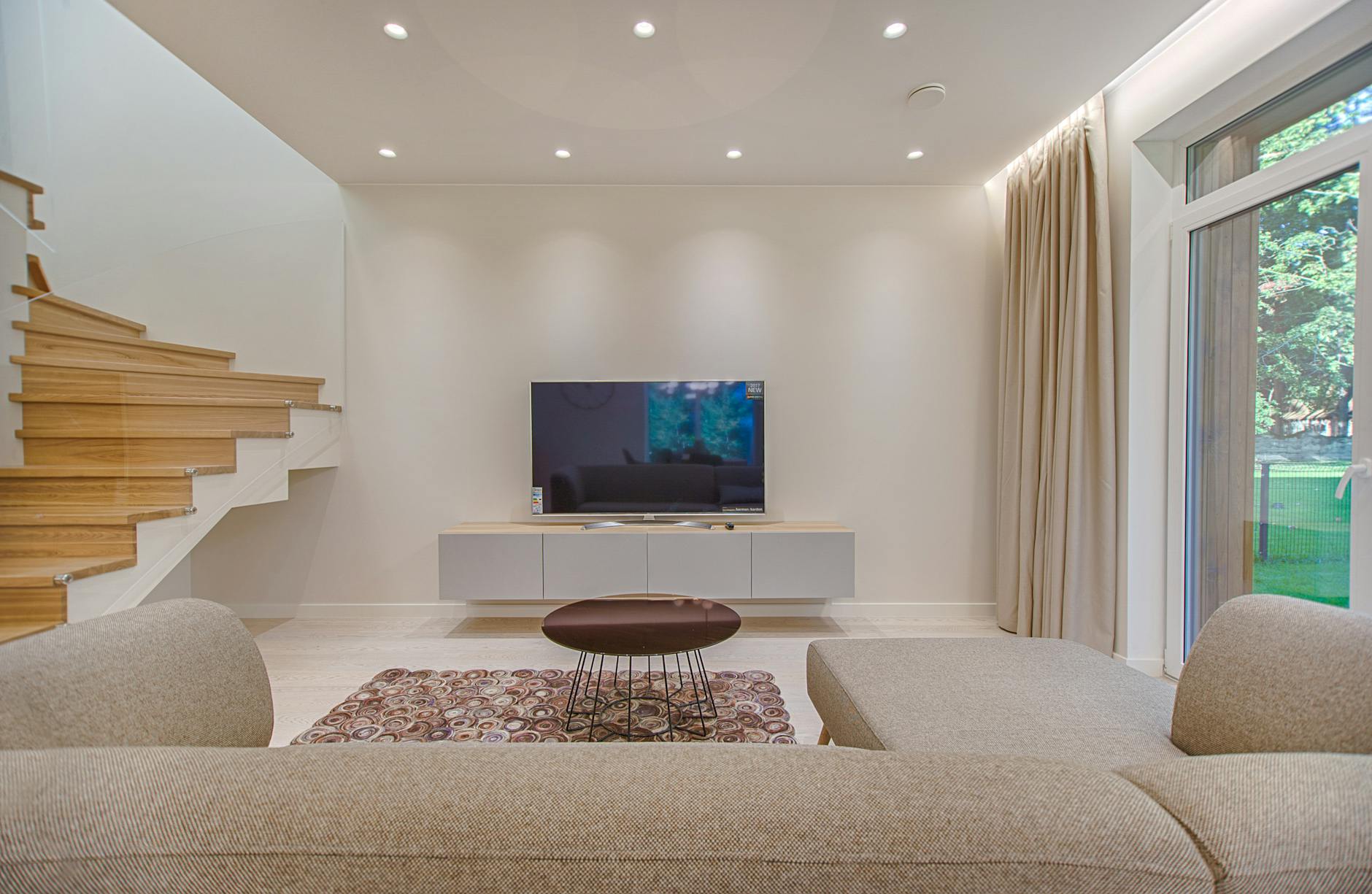
Where do you position your TV in your living room? Finding the Perfect Placement for your Entertainment
In the modern home, the television is often the focal point of the living room, acting as a hub for entertainment, relaxation and family time. The placement of your TV plays a crucial role in determining the overall aesthetics and functionality of the space.
Finding the perfect spot requires careful consideration of various factors, including room layout, seating arrangement, and the viewing experience you desire.
In this guide, we will explore different strategies and ideas to help you position your TV for maximum enjoyment in your living room.
Table of Contents
Considering Room Layout, Seating Arrangement, Room Size & Decor
Before diving into specific TV placement options, it’s important to understand the basic principles that influence your decision:
Room Layout – is your room an Open Concept or a Closed Space?
Consider whether your living room is part of an open-concept layout or a closed space. Open layouts may offer more flexibility in TV placement, while closed spaces might have predefined areas for the TV.
Seating Arrangement – think about optimal viewing angles
The goal is to ensure that everyone in the room has a comfortable and unobstructed view of the TV. Avoid placing the TV too high or too low, and consider the angle from different seating positions.

Room Size – think about your screensize and viewing distance
The size of your TV and the viewing distance are crucial. A larger TV might require more space, and the distance from the seating area affects the viewing experience.
Aesthetics – how will your TV integrate with your decor?
Your TV should complement the overall aesthetics of the living room. Consider how the TV fits in with the decor, whether it’s mounted on the wall, placed on a stand, or incorporated into a media console.
What are some different TV Placement and Mounting Ideas?
Now, let’s explore various TV placement ideas to help you find the perfect spot for your television in the living room:
Wall-Mounted TV
Mount your TV Above the Fireplace
Mounting the TV above the fireplace is a popular choice, creating a centralized and visually appealing focal point. Ensure the viewing height is comfortable for seated viewers.

Install Floating Shelves
Install floating shelves on an empty wall to create a minimalist and stylish setup. This is ideal for smaller living rooms where floor space is limited.


Media Console or TV Stand
Centered in a Media Console
Place the TV on a media console or TV stand, ensuring it is centered and proportional to the furniture. This setup allows for additional storage and organization of media devices.


Corner TV Stand
If your living room layout leans towards a corner, consider a corner TV stand. This maximizes space and utilizes the corner effectively.


Built-In TV Unit
Custom Built-In Wall Unit
Create a seamless look by incorporating a custom-built wall unit that surrounds the TV. This provides ample storage for electronics, books, and decorative items, enhancing the overall aesthetic.
Integrated Shelves
Build shelves around the TV to display decorative items, books, or personal mementos. This option adds character to the living room while maintaining functionality.

Ceiling-Mounted TV
Suspended TV Mount
For a unique and modern look, consider a ceiling-mounted TV. This is particularly effective in rooms with high ceilings, providing a floating effect.

Multi-Functional Furniture
TV in a Bookshelf
Integrate the TV into a large bookshelf or wall unit. This creates a cohesive look, and the TV becomes part of the overall decor.

Projector and Screen
Home Theater Setup
Transform your living room into a home theater by using a projector and screen. This works well in larger living rooms where you can control lighting for an immersive experience.
I have two of these projectors, and I must say, they are AMAZING. I have one in the living room and in the bedroom, and they are perfect for watching Netflix /Streaming services. Highly recommended.

Tips for Optimal TV Placement
To enhance your TV placement decisions, consider the following tips… :
Place your TV at Eye Level
The ideal height for mounting a TV is at eye level when seated. This obviously reduces neck strain and ensures a comfortable viewing experience.
Seating Arrangement around the TV
Arrange furniture so that all seating areas have a clear view of the TV. Avoid placing furniture too close or too far from the screen.
Consider Viewing Angles for the TV
If you have a sectional sofa or multiple seating areas, ensure that everyone has a good viewing angle without having to strain or turn their heads excessively.
TV Cable Management
Conceal cables and wires for a clean and organized look. Use cable management solutions or wall channels to keep wires out of sight.
Lighting Considerations
Position the TV to minimize glare from natural and artificial light sources. Consider blackout curtains or adjustable lighting to control reflections on the screen.
Ventilation
If you’re placing electronic components like gaming consoles or streaming devices in an enclosed space, ensure proper ventilation to prevent overheating.
Create a Focal Point
Designate the TV as a focal point by framing it with decorative elements such as artwork, shelves, or accent lighting.
Balance with Decor
Choose a TV stand, media console, or wall color that complements the overall decor of the living room. Ensure a harmonious blend of style and functionality.
Common questions related to TV placement
Should my TV be positioned at the center of living room?
No! There certainly isn’t a requirement that states that the TV must be positioned at the center of the room.
It’s worth considering whether your living room is primarily utilized for conversations rather than watching television. If it is, then it could be practical to emphasize a comfortable furniture layout first and then incorporate the TV wherever it suits best.
Can I really put my TV above a fire?
Yes, you can position your TV above your fireplace, and this arrangement is quite common in many homes. Placing a TV above the fireplace can create a central and visually appealing focal point in your living room or family room.
However, there are several considerations and precautions to keep in mind to ensure the safety and optimal viewing experience:
Consider Heat Exposure
Fireplaces generate heat, and excessive heat can damage electronic devices, including your TV.
Ensure that your fireplace is designed with a heat shield or a mantel that provides adequate protection for the TV. Some TVs come with specific guidelines for the maximum temperature they can handle, so check your TV’s user manual for this information.
Different types of TVs have varying heat resistance capabilities. If you’re planning to install a TV above a fireplace, consider using a TV specifically designed for this purpose or one that has been tested for heat resistance.
Finally, ensure that the TV is mounted in a way that allows for proper ventilation. Adequate airflow around the TV is essential to prevent overheating, especially if it’s positioned above a heat source like a fireplace.

What Height should I Mount my TV?
Ideally, the center of the screen should be at or slightly above eye level when seated for comfortable viewing.
If the TV is too high, it can strain your neck during extended viewing sessions.
How can I prevent neck strain when watching TV..?
To address potential neck strain caused by the height of the TV, consider using a tilting or swiveling wall mount. These mounts allow you to adjust the angle of the TV to achieve a more comfortable viewing position.

How to I manage my Cables around my TV?
Plan for cable management to conceal wires and cables running from the TV down to your entertainment components. This not only looks neater but also helps prevent accidents and keeps the area around the fireplace safe.

How far should your TV be from your couch?
Determining the ideal distance between your TV and couch depends on various factors, including the size of your TV, the screen resolution, and your personal preferences. However, there are some general guidelines that you can consider to achieve an optimal viewing experience. The Society of Motion Picture and Television Engineers (SMPTE) recommends a viewing angle of about 30 degrees for an immersive experience.
Here’s a basic formula to help you calculate the recommended distance for your TV:
Measure the TV Size
Measure the diagonal size of your TV in inches. The size is typically provided by the manufacturer.
Calculate Recommended Distance
Multiply the TV size (in inches) by a factor of 1.5 to 2.5. This factor accounts for the recommended viewing angle.
For example, if you have a 55-inch TV, the recommended viewing distance could be between 82.5 inches (55 inches x 1.5) and 137.5 inches (55 inches x 2.5).
Convert Inches to Feet
Convert the calculated distance from inches to feet, as it’s more practical for room measurements.
Keep in mind that these guidelines provide a starting point, and personal preferences play a significant role in determining the final distance. Here are additional considerations:
- Resolution: If you have a high-resolution TV, such as a 4K or 8K TV, you can sit closer to the screen without sacrificing image quality. The higher resolution allows for a more detailed and clear picture even at shorter distances.
- Room Size and Layout: Consider the size and layout of your room. In larger rooms, you might need to sit farther back to take in the entire screen comfortably. Conversely, in smaller rooms, you might sit closer to the TV.
- Eye Level: When determining the ideal distance, also consider the eye level. The center of the screen should be at or slightly above eye level when seated for a comfortable viewing experience.
- Personal Preference: Ultimately, personal preference plays a crucial role. Some people prefer a more immersive experience and may choose to sit closer, while others prefer a more relaxed viewing distance.
As a general rule of thumb, if you find that you need to move your head or eyes significantly to take in the entire screen, you might be sitting too close. On the other hand, if you’re struggling to see details or read text, you might be sitting too far away.
Experiment with different distances within the recommended range and make adjustments based on your comfort and enjoyment. It’s always a good idea to consider your own viewing habits and preferences when determining the best TV-to-couch distance for your specific setup.
Can a TV be too big for a room?
Yes, a TV can be too big for a room, and finding the right size is crucial for an optimal viewing experience and overall aesthetics. While a larger TV screen can provide a more immersive experience, there are practical considerations and guidelines to ensure that the size is suitable for your room.
Here are some factors to consider when determining if a TV is too big for a room:
Viewing Distance
The distance between the TV and the seating area is crucial. If the TV is too large for the viewing distance, it can result in a strained and uncomfortable viewing experience. On the other hand, if the TV is too small for a large viewing distance, details may be lost.
Room Size
Consider the overall size of the room. In smaller rooms, an excessively large TV may dominate the space and create an overwhelming visual presence. It can also limit the flexibility of furniture placement.
Room Layout
The layout of the room, including the placement of furniture and the TV, is essential. If the TV is too large for the available wall space or the arrangement of furniture, it can disrupt the balance and flow of the room.
TV Resolution
Higher resolution TVs, such as 4K or 8K, can support larger screen sizes without sacrificing image quality. If you have a large room and want a larger screen, opting for a higher resolution TV can provide a clearer and more detailed picture.
Comfort and Immersion
While a larger TV can enhance the sense of immersion, it should not overwhelm the viewing experience or cause discomfort. Ideally, viewers should be able to take in the entire screen comfortably without constant head movement.
Aesthetic Considerations
Consider the overall aesthetics of the room. An oversized TV might dominate the visual landscape and clash with the room’s decor. Strive for a balanced and harmonious look that complements the size of the room.
How to determine the appropriate TV size for your room?
To determine the appropriate TV size for your room, you can use the following guidelines:
Measure Viewing Distance
Measure the distance from your seating area to where the TV will be placed. Use this distance to determine the recommended screen size based on industry guidelines.
Consider Room Size
Take into account the dimensions of the room, including ceiling height and available wall space. A larger room can accommodate a larger TV, but it should be proportional to the space.
Test with Templates
Before making a final decision, you can create a paper template or use masking tape to outline the proposed TV size on the wall. This allows you to visualize the impact on the room before committing to a purchase.
Conclusion
Finding the perfect spot for your TV in the living room is a combination of practicality and aesthetics.
Whether you opt for a wall-mounted display, integrated built-ins, or a traditional media console, consider the unique features of your space and your personal preferences.
Experiment with different arrangements, and don’t be afraid to get creative!
You may also be interested in
Review: Kärcher WV 2 Plus Window Vac (and a comparison to Kärcher WV 1)
How to Use Smart Plugs in Your Home and why you need one!
How to Tackle Mould in Your Home
Plants That Absorb Air Moisture: Enhancing Indoor Air Quality in the UK
How to make your rooms look bigger using mirrors
Blob Mirrors: The Hottest Interior Trend of 2023
Unveiling the Benefits of Stick-On Mirrors
Making the Most of Your Small Entrance way
How to Make the Most of Limited Space : Small Living Rooms
Best Sofa Designs for Small Living Rooms
Mirrors for Your Living Room Wall
A Guide to Runners for Hallways
Must-Have Space Saving Products for Small Apartments
The Benefits of Oversized Mirrors in Bedrooms
The Magic of Peel & Stick Wallpaper – Self Adhesive Revolution
Why You Need a Glitter Ball / Mirror Ball in Your Home
How to make your bathroom smell like a spa: Aromatherapy Tips and Techniques
The Best Modern Wall Clocks: Minimalist, Retro, Tech-Infused, Statement & Artistic designs

Leave a Reply