
The 7 Best Cable Management Solutions for a Productive Home Office (2026)
In today’s technology-driven world, the average home office is teeming with a myriad of electronic devices, from computers and monitors to printers and charging cables. While these gadgets are essential for productivity and connectivity, they often come with a downside: cable clutter.
The sight of tangled cords and wires can not only be aesthetically displeasing but also pose safety hazards and hinder workflow efficiency.
Fortunately, with the right cable management solutions, you can tame the cable chaos and transform your home office into a clean, organized, and clutter-free space.
In this article, we review a wide range of cable management options, from simple DIY hacks to advanced cable management systems, to help you reclaim control over your workspace.
Table of contents
The Desk Mess Problem-Solver
Find the perfect fix for your specific cable chaos.
| The Problem | Recommended Solution | Recommended Product |
| Heavy Power Strips on the Floor | Under-Desk Cable Tray | REFLYING No-Drill Tray |
| Visible Wires on Walls/TVs | Cable Raceway/Cover | Self-Adhesive Cord Cover |
| “Spiderweb” of PC/Monitor Cords | Flexible Sleeves | Alex Tech Wire Loom |
| Tangled Floor Tangles | Cable Tidy Box | D-Line Cable Management Box |
| Cables Sliding Off the Desk | Silicone Clips & Ties | Multi-Pack Cable Clips |
| Unplugging the Wrong Device | Identification Tags | Self-Adhesive Cable Labels |
| Too Many Peripherals | Wireless Tech | Logitech MX Master 3S (Wireless) |
What are cable management systems?
Cable management systems are a set of tools, accessories designed to organize, conceal, and protect cables and wires in a home office or any workspace where electronic devices are used.
These systems aim to create a tidy and clutter-free environment by safely routing cables, preventing tangling and tripping hazards, and maintaining easy access to power and connectivity.
In a typical home office setup, there are numerous cables and wires associated with computers, monitors, printers, chargers, and other electronic devices. Without proper management, these cables can become tangled messes, detracting from the aesthetic appeal of the workspace and making it difficult to locate specific cables or troubleshoot connectivity issues.
Cable management systems address these challenges by providing solutions to organize and conceal cables, such as cable trays, raceways, sleeves, clips, ties, and mounts.
These systems come in various shapes, sizes, and materials to accommodate different types of cables and installation requirements.
What are the Different Types of Cable Management Systems?
Let’s explore a variety of solutions to help you conquer cable chaos in your home office:
Cable Management Trays: Best for Under-Desk Organization
Cable trays are open or enclosed structures mounted underneath desks or along walls to hold and route cables. They come in various sizes and materials, such as metal or plastic, and can accommodate multiple cables, power strips, and surge protectors.


Cable Raceways & Cord Covers: The Top Choice for Wall-Mounted TVs
Cable raceways are channels or conduits designed to conceal cables along walls, floors, or ceilings. They come in different shapes and styles, including flat, round, or corner-mounted, and can be painted to blend with the surrounding decor.
These discreet channels come in a range of sizes and colors to blend seamlessly with your home office decor. They’re ideal for routing cables behind furniture or along walls without the need for drilling or permanent installation.


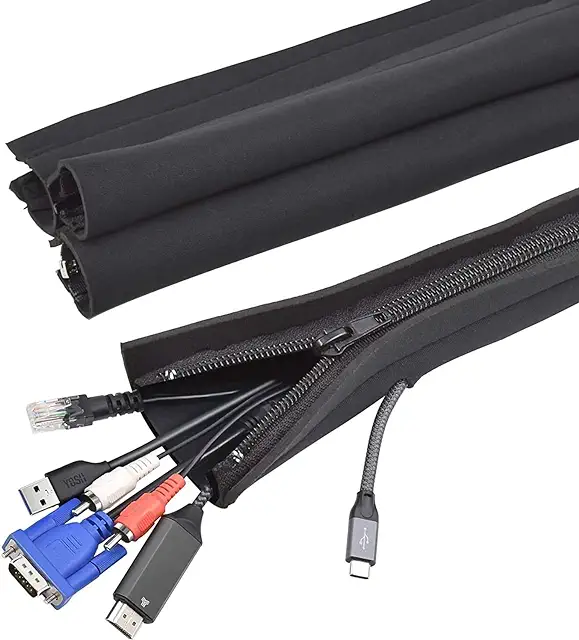
Cable Management Sleeves: Best for Bundling Monitor & PC Cords
Cable sleeves, also known as cord covers or wire looms, are flexible tubes or sleeves that encase and bundle cables together. They come in various lengths and diameters and are made from materials like neoprene, nylon, or fabric.
They offer a sleek and discreet way to conceal and manage cables running along the floor or desktop, and help minimize clutter and trip hazards while maintaining easy access to cables when needed.

Sleeve


Cable Clips and Ties: Keeping Your Desktop Charging Cords in Reach
Cable clips and ties are small accessories used to secure cables to surfaces, such as desks, walls, or baseboards. These adhesive or clamp-style holders can be attached to the underside of your desk or along the edge of your workspace to corral cables and prevent them from tangling or dangling.
They come in various sizes and styles to accommodate different types of cables, such as USB cords, power cables and Ethernet cables.

Cable Management Boxes: The Best Way to Hide Ugly Power Strips
Cable management boxes are containers designed to conceal power strips, surge protectors, and excess cables. They feature openings or slots for cables to enter and exit, keeping them organized and out of sight.


Desk Grommets and Cable Pass-Throughs
Desk grommets are circular or rectangular covers installed in desktops or cable holes to route cables from the surface to the underside of the desk. They provide a clean and organized way to manage cables while maintaining accessibility.
Many desks come with pre-installed grommets, but you can also add custom grommets using a drill bit to create a hole in your desk. When purchasing desk grommets, you will typically also receive a drill bit of the correct size to create the hole.


Wireless Technology
Perhaps obvious… but for ultimate cable-free convenience, consider utilizing wireless technology whenever possible.
Wireless keyboards, mice, printers, headphones and speakers eliminate the need for cumbersome cables and adapters, reducing clutter and simplifying your workspace setup. Additionally, wireless charging pads can keep your smartphone and other devices powered up without the hassle of cords and cables.
You can learn more about the best keyboards, mice and headphones for your home office in these articles :
Top 5 Keyboards for Working from Home
Best Mice for Working from Home
Top 5 Computer Headphones for Working from Home
How to Choose the Right Cable Management System:
When selecting a cable management system for your home office, consider the following factors:
| Consideration | Description |
|---|---|
| Cable Types | Ensure the cable management system is compatible with all the cables you use, including power cords, Ethernet, HDMI, and USB cables. |
| Installation Method | Choose a system that fits your setup preferences, such as screw-mounted solutions, adhesive backing, or freestanding cable organizers. |
| Workspace Layout | Take into account the size and layout of your home office to determine the most effective placement and configuration of cable management solutions. |
| Aesthetic Preferences | Select cable management products that match your office décor, whether you prefer a minimalist, industrial, or traditional look. |
| Future Expansion | Opt for a scalable system that allows room for future upgrades, such as adding new devices or rearranging furniture. |
Benefits of Cable Management
| Benefit | Description |
|---|---|
| Improved Aesthetic | Concealing cables and wires creates a clean, organized workspace that enhances the overall look of a home office. |
| Reduced Clutter | Eliminates tangled cables and tripping hazards, making it easier to locate specific cables or devices. |
| Enhanced Safety | Reduces the risk of electrical hazards such as frayed or exposed wires, helping prevent accidents and injuries. |
| Increased Productivity | A tidy workspace minimizes distractions, allowing users to focus more effectively on their work. |
| Extended Cable Lifespan | Protects cables from bending, pulling, or crushing, helping them last longer and perform reliably. |
| Ease of Maintenance | Organized cables make troubleshooting and maintenance quicker and more straightforward. |
Tips for Effective Cable Management
In addition to the solutions listed above, here are some tips to help you achieve effective cable management in your home office:
| Cable Management Tip | Description |
|---|---|
| Plan Your Home Office Layout | Before setting up your workspace, plan where devices will be placed and how cables will be routed. This helps you choose the most effective cable management solutions. |
| Label Your Cables | Labeling cables makes it easy to identify which cable belongs to each device, especially when multiple devices share a power strip or surge protector. |
| Bundle Your Cables Together | Group similar cables and secure them with cable ties or sleeves to reduce clutter and create a more organized workspace. |
| Use Color-Coding for Cables | Color-coded ties or labels help distinguish between power, data, and audio cables for easier identification and management. |
| Keep Cables Off the Floor | Use cable trays, clips, or under-desk systems to keep cables off the floor, reducing clutter and minimizing tripping hazards. |
| Regularly Review and Adjust | As your workspace changes, review and update your cable management setup to ensure it stays efficient and effective. |
The Standing Desk Challenge: Dynamic Cable Management
As more home offices shift to sit-stand desks, the need for flexible Cable Management Solutions has skyrocketed.
- Avoid the “Snag”: When using Cable Management Sleeves, always set your desk to its highest position before securing your wires. This ensures you have enough “slack” to prevent cables from being yanked out of your PC.
- The Integrated Setup: By mounting a Cable Management Tray (like the REFLYING model) directly to the desk, your power strip moves with the furniture. This means only one main power cord needs to travel to the wall, creating a much cleaner look.
Aesthetics vs. Accessibility: Choosing Your Management Style
When choosing between Cable Management Boxes and Cable Raceways, consider how often you change your tech.
- For Permanent Setups: Cable Raceways and Sleeves offer the most “invisible” look but can be time-consuming to open if you need to replace a cable.
- For Flexible Setups: If you frequently swap out chargers or peripherals, a Cable Management Box or Magnetic Cable Clips are superior. They allow you to access or add new cords in seconds without tools.
Adding a “Rental-Friendly” section is a brilliant move. People living in flats or using temporary workspaces are often terrified of losing their security deposit by drilling holes or peeling off paint.
By specifically calling out these solutions, you tap into a high-intent audience that is looking for “safe” ways to organize.
The Renter’s Guide to Damage-Free Cable Management
If you are renting your home or have invested in a high-end desk, the last thing you want to do is reach for a power drill. Standard cable management often relies on screws, but you can achieve a “pro-studio” look without leaving a single permanent mark.
1. Use Clamp-On Systems
Instead of drilling into the underside of your desk, look for “C-Clamp” solutions. The REFLYING No-Drill Cable Management Tray is a lifesaver for renters. It clamps onto the edge of any desk (including glass!) and provides a sturdy basket for your power strips and “bricks” without a single screw.
2. The Hairdryer Trick for Adhesives
Many Cable Raceways and Silicone Clips come with ultra-strong 3M adhesive. While great for staying put, they can rip paint off the wall when you move out.
The Secret: When it’s time to move, use a hairdryer to heat the plastic for 30 seconds. This softens the glue, allowing you to peel the clip or raceway off smoothly without damaging the surface.
3. Command Strip Upgrades
For lightweight items like Cable Labels or small Cord Covers, consider swapping the included adhesive for Command Strips. These are specifically designed to be removed cleanly and provide plenty of strength for managing standard USB and HDMI cables.
4. The “Weighted” Solution
If you aren’t allowed to stick anything to the walls or desk at all, use Weighted Cable Holders. These sit on top of your desk and use gravity and a non-slip base to keep your charging cables from sliding behind the furniture, requiring zero adhesive or hardware.
Common Questions About Cable Management Solutions for Your Home Office
What is the best way to manage multiple monitor cables?
Managing multiple monitor cables can be done efficiently with a combination of cable trays, cable clips, and cable sleeves.
Start by using a cable tray or under-desk cable management system to route and hide the cables.
Cable sleeves can bundle the monitor cables together, while cable clips can help guide them along the back of your desk or along the wall, keeping them organized and out of sight.
How can I prevent my cables from tangling?
To prevent cables from tangling, use cable ties or Velcro straps to bundle cables together. Cable spoolers or winders are also effective for managing excess cable length and keeping them neatly coiled.
Regularly organizing and securing your cables with these tools will help maintain a tangle-free workspace.
Are there cable management solutions for wireless charging stations?
Yes, cable management boxes with built-in charging stations are a great solution for organizing cables while charging multiple devices. These boxes can conceal power strips and charging cables, providing a clean and clutter-free area for your wireless charging setup.
Additionally, magnetic cable organizers can help keep charging cables neatly in place.
Can cable management solutions improve my workspace ergonomics?
Absolutely. Proper cable management can enhance workspace ergonomics by keeping cables out of the way, reducing the risk of tripping and creating a more organized environment.
This allows for a more comfortable and efficient workspace, which is essential for maintaining good posture and reducing strain during long working hours.
What should I consider when choosing cable management products?
When selecting cable management products, consider the size of your workspace, the number of cables you need to manage, and your aesthetic preferences.
Look for products that offer flexibility, such as Velcro straps or adjustable cable wraps, which can accommodate changes in your setup.
Additionally, consider the materials and durability of the products to ensure they provide long-term solutions for your cable management needs.
How can I manage cables for a standing desk?
Managing cables for a standing desk requires solutions that can accommodate the movement of the desk. Cable management sleeves with stretchable materials or coiled cable wraps can allow cables to expand and contract as the desk height changes.
Additionally, cable trays mounted under the desk can move with the desk, keeping cables organized and preventing them from getting caught or tangled.
Are there eco-friendly cable management options?
Yes, there are eco-friendly cable management options available. Products made from recycled materials, such as some Velcro straps and cable sleeves, offer a more sustainable choice.
Additionally, opting for reusable cable ties and wraps, rather than single-use plastic ties, can reduce waste and support an eco-conscious approach to organizing your workspace.
How do I manage cables for a home office in a rented space?
If you’re in a rented space and cannot make permanent modifications, consider using non-invasive solutions like adhesive cable clips, Velcro straps, and cable sleeves.
Cord concealers with adhesive backing can be removed without damaging walls, and under-desk cable management trays can be installed using removable adhesive strips instead of screws.
What are the benefits of using cable management boxes?
Cable management boxes offer several benefits, including keeping power strips and excess cables out of sight, reducing clutter, and protecting cables from dust and damage.
They also enhance safety by minimizing the risk of tripping over loose cables and provide a cleaner, more organized appearance for your home office.
How can I manage cables that run along the wall or floor?
For cables that run along the wall or floor, cord concealers and cable raceways are ideal solutions.
These products cover and protect the cables, keeping them secured and out of sight. They can be painted to match your walls or flooring, blending seamlessly with your home office decor.
What are some DIY cable management tips?
DIY cable management tips include using binder clips to secure cables to the edge of your desk, repurposing toilet paper rolls to organize and label cables, and using zip ties to bundle and shorten excess cable length.
Additionally, creating a cable box using a shoebox and decorative paper can provide a budget-friendly solution for hiding power strips and cables.
How do I label my cables for easy identification?
Labeling your cables is easy with cable labels or using color-coded Velcro straps. You can also use simple adhesive labels or masking tape with handwritten notes.
Labeling helps you quickly identify and manage your cables, especially in setups with multiple devices and connections.
Can poor cable management affect my devices’ performance?
While poor cable management doesn’t directly affect device performance, it can lead to issues such as cables becoming tangled, bent, or damaged, which can eventually cause connection problems or device failures.
Proper cable management reduces these risks, helping to maintain the longevity and reliability of your electronics.
What are the best cable management solutions for gaming setups?
For gaming setups, where multiple cables are often needed, cable sleeves, under-desk cable trays, and magnetic cable organizers are great options.
Cable clips can help route cables along the desk or wall, while cable management boxes can hide power strips and excess cables.
Ensuring that all cables are organized and accessible will enhance your gaming experience and keep your setup looking clean.
How do I keep charging cables organized on my desk?
To keep charging cables organized on your desk, use cable clips or magnetic cable holders to secure them in place.
You can also use a charging station or cable management box with built-in charging ports to consolidate and hide your charging cables.
What are the pros and cons of using cable sleeves?
Pros: Cable sleeves offer a clean and streamlined way to bundle and conceal multiple cables, protecting them from dust and damage. They are also flexible and can be adjusted to fit different cable lengths.
Cons: Cable sleeves can be more time-consuming to install and adjust, and they may not be suitable for situations where individual cable access is frequently needed.
Can cable management improve the airflow in my home office?
Yes, proper cable management can improve airflow by reducing clutter and allowing for better ventilation around your electronics.
This is particularly important for devices like computers and monitors, which can overheat if airflow is restricted by tangled or obstructive cables.
Keeping cables organized and out of the way helps maintain optimal operating conditions for your equipment.
Conclusion
In conclusion, effective cable management is essential for creating a functional, safe, and aesthetically pleasing home office environment.
By implementing a combination of cable management solutions, from simple cable clips and sleeves to more advanced raceways and grommets, you can tame cable chaos and transform your workspace into a clean, organized and clutter-free oasis of productivity.
With careful planning, regular maintenance and a commitment to quality, you can conquer cable clutter once and for all and enjoy a more streamlined and efficient home office experience.
You may also be interested in
How to Tackle Mould in Your Home
Plants That Absorb Air Moisture: Enhancing Indoor Air Quality in the UK
The Best House Plants for a Small Bathroom with No Windows
The Best Essential Oil Recipes for Home Oil Diffusers
A Comprehensive Guide to Using Reed Diffusers in Your Home
Review: Kärcher WV 2 Plus Window Vac (and a comparison to Kärcher WV 1)
How to Use Smart Plugs in Your Home and why you need one!
Must-Have Space Saving Products for Small Apartments
The Benefits of Oversized Mirrors in Bedrooms
The Magic of Peel & Stick Wallpaper – Self Adhesive Revolution
Why You Need a Glitter Ball / Mirror Ball in Your Home
How to make your bathroom smell like a spa: Aromatherapy Tips and Techniques
The Best Modern Wall Clocks: Minimalist, Retro, Tech-Infused, Statement & Artistic designs



Leave a Reply