
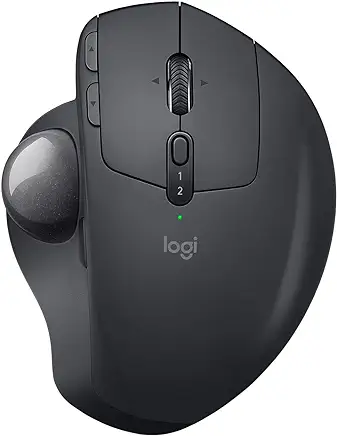
10 Best Mice for Working From Home (2026): Ergonomic & Productivity Picks
In today’s digital age, a reliable computer mouse is an essential tool for navigating your work tasks efficiently and comfortably. If you’re working from home, having the right mouse can greatly impact your productivity and overall comfort during extended hours at the computer.
In this article, we explore the best computer mice that are tailored to enhance your work-from-home experience and the factors you should consider when choosing your perfect mouse for remote work.
Table of Contents
| Model | Type | Best For… | Connection | Check Price |
| Logitech MX Master 3S | Ergonomic | The Overall Winner | Bluetooth / USB | Check Price |
| Microsoft Surface Precision | Sleek/Pro | Surface & PC Users | Bluetooth / Wired | Check Price |
| Anker Vertical Mouse | Vertical | Budget Ergonomics | 2.4GHz Wireless | Check Price |
| Apple Magic Mouse 2 | Multi-Touch | Mac Minimalists | Bluetooth | Check Price |
| Logitech MX Ergo | Trackball | Preventing Wrist Pain | Bluetooth / USB | Check Price |
| Kensington Expert Mouse | Trackball | Large Stationary Control | Bluetooth / USB | Check Price |
| Razer Pro Click | High-Precision | Detail-Oriented Work | Bluetooth / 2.4GHz | Check Price |
| Logitech M720 Triathlon | Multi-Device | Switching Between PCs | Bluetooth / USB | Check Price |
| HP Z5000 Rechargeable | Slim | Portability & Style | Bluetooth | Check Price |
| Corsair Dark Core RGB/SE | Hybrid | Work & Gaming (Qi Charging) | Bluetooth / USB | Check Price |
What should be considered when choosing a perfect work from home mouse?
Before we talk about our recommended mice for working from home, let’s first discuss the key factors that should be considered when choosing your perfect mouse for remote work.
An ideal wfh mouse should offer comfort, precision, and functionality to support prolonged use and productivity. Here are some features and considerations that make a mouse well-suited for remote work:
| Feature | Why It Matters |
|---|---|
| Mouse Ergonomics | Comfort is essential for long periods of use. An ergonomic mouse supports a natural hand position, reducing strain on the wrist and fingers and helping prevent repetitive strain injuries (RSI). |
| Wireless Connectivity | Wireless mice reduce desk clutter and improve flexibility. Look for reliable Bluetooth or USB receiver connections for consistent performance. |
| Adjustable Sensitivity (DPI) | Adjustable DPI allows you to customise cursor speed and precision, making the mouse suitable for different tasks such as design work, gaming, or general productivity. |
| Programmable Buttons | Customisable buttons enable shortcuts and task-specific functions, helping streamline workflows and boost efficiency. |
| Battery Life | Long battery life is especially important for wireless mice, reducing the need for frequent charging or battery replacement. |
| Tracking Technology | Optical and laser sensors provide accurate tracking on various surfaces. Reliable tracking ensures smooth and precise cursor movement. |
| Operating System Compatibility | Ensure compatibility with Windows, macOS, or Linux to guarantee full functionality and seamless integration. |
| Size and Weight | The right size and weight depend on hand size and personal preference—lighter mice suit portability, while heavier ones can offer more control. |
| Additional Features | Extras such as custom scroll wheels, thumb rests, or adjustable grips can enhance comfort and usability for specific tasks. |
Ultimately, the ideal mouse for working from home varies based on individual preferences and needs. Test different mice if possible, considering factors like ergonomics, connectivity, and features to find the one that best suits your working style and enhances your productivity while maintaining comfort during long hours of use.
The Best Mice for working from home
1. Logitech MX Master 3S: The Ultimate Productivity Powerhouse
The Logitech MX Master 3 is a popular choice for professionals seeking an ergonomic and highly customizable mouse. With its ergonomic design and advanced tracking capabilities, this mouse provides a comfortable grip and precise control. The customizable buttons, fast scrolling wheel, and easy switching between devices make it a versatile tool for multitasking and seamless navigation.
Key Features
- Ergonomic Design: The sculpted shape supports your hand and wrist, reducing strain.
- Advanced Tracking: Darkfield™ high precision tracking allows it to work on any surface, including glass.
- Customizable Buttons: Features six programmable buttons and a unique thumbwheel for horizontal navigation.
- Multi-Device Support: Can connect to up to three devices simultaneously via Bluetooth or USB receiver.
- Fast Charging: USB-C rechargeable battery lasts up to 70 days on a full charge.
Why It’s Great for Working from Home
The MX Master 3’s ergonomic design and customizable features make it ideal for long working hours. Its multi-device support is perfect for those who switch between different computers or tablets, enhancing productivity.

2. Microsoft Surface Precision Mouse: The Best Sleek Choice for PC Power Users
For those who prefer a sleek and stylish design, the Microsoft Surface Precision Mouse is a premium choice.
Designed to match the aesthetic of Microsoft Surface devices, this mouse features a comfortable grip and customizable buttons. It offers smooth scrolling and high-resolution tracking, ensuring accurate movement on various surfaces.
Key Features
- Ergonomic Comfort: Sculpted for a comfortable grip and natural hand position.
- Smooth Scrolling: Offers precise control with both smooth and ratchet scrolling modes.
- Customizable Buttons: Three programmable buttons to tailor functions to your workflow.
- Multi-Device Functionality: Connects with up to three computers simultaneously.
- Rechargeable Battery: Long battery life with fast recharging capabilities.
Why It’s Great for Working from Home
The Surface Precision Mouse provides excellent control and precision, making it suitable for detailed work. Its ergonomic design ensures comfort during extended use, and multi-device support enhances productivity.

3. Anker Ergonomic Vertical Mouse: Best Budget-Friendly Ergonomic Solution
If you’re looking for a mouse that promotes ergonomic comfort, the Anker Ergonomic Vertical Mouse is worth considering.
Its vertical design encourages a more natural wrist and forearm position, reducing strain and discomfort during prolonged computer use. The mouse also offers adjustable DPI settings for precise cursor control.
Key Features
- Vertical Design: Promotes a handshake position to reduce strain on the wrist and forearm.
- Precision Tracking: Adjustable DPI settings (800, 1200, 1600) for precise control.
- Comfortable Grip: Contoured shape with a soft-touch finish for enhanced comfort.
- Wireless Connectivity: Uses a USB receiver for a reliable wireless connection.
- Affordable Price: Budget-friendly option with essential ergonomic features.
Why It’s Great for Working from Home
The Anker Ergonomic Vertical Mouse offers significant ergonomic benefits at an affordable price. Its vertical design reduces strain, making it suitable for long hours of work.

4. Apple Magic Mouse 2: The Best Minimalist Mouse for Mac Enthusiasts
The Apple Magic Mouse 2 is a sleek and stylish mouse that integrates seamlessly with macOS. Its minimalist design and multi-touch surface make it a great choice for Apple users.
Key Features
- Multi-Touch Surface: Allows for intuitive gestures like swiping and scrolling.
- Rechargeable Battery: Built-in battery charges quickly via a Lightning cable.
- Low Profile Design: Compact and lightweight, perfect for a clutter-free desk.
- Seamless Integration: Pairs automatically with Mac devices and supports macOS features.
Why It’s Great for Working from Home
The Magic Mouse 2’s multi-touch surface and seamless integration with macOS make it an excellent choice for Mac users. Its minimalist design reduces desk clutter and enhances the aesthetic of your workspace.

5. Logitech MX Ergo: The Best Trackball Mouse for Personalized Wrist Comfort
The Logitech MX Ergo is an ergonomic trackball mouse designed to provide comfort and precision. It’s ideal for users who experience wrist strain with traditional mice.
Key Features
- Ergonomic Design: Adjustable hinge allows for customized angle settings.
- Trackball Control: Offers precise control with minimal hand movement.
- Customizable Buttons: Eight programmable buttons for tailored functions.
- Multi-Device Support: Connects to two devices simultaneously and switches between them easily.
- Rechargeable Battery: Long-lasting battery with fast charging via USB-C.
Why It’s Great for Working from Home
The MX Ergo’s ergonomic design and trackball control make it perfect for reducing wrist strain. Its customizable buttons and multi-device support enhance productivity and comfort during long work sessions.

6. Kensington Expert Mouse: Best Large-Format Trackball for Precise Navigation
The Kensington Expert Mouse Wireless Trackball is a high-performance trackball mouse known for its precision and comfort. It’s an excellent choice for users who prefer trackball control.
Key Features
- Large Trackball: Provides smooth and precise cursor control.
- Ergonomic Design: Supports a comfortable hand position and reduces wrist movement.
- Scroll Ring: Allows for easy scrolling without moving the hand.
- Customizable Buttons: Four programmable buttons for personalized functions.
- Wireless Connectivity: Connects via Bluetooth or USB receiver.
Why It’s Great for Working from Home
The Expert Mouse’s large trackball and ergonomic design make it perfect for precision tasks. Its customizable buttons and wireless connectivity enhance productivity and comfort.

7. Razer Pro Click: The Best High-Precision Mouse for Creative Professionals
The Razer Pro Click is a high-precision mouse designed for productivity and comfort. It combines ergonomic features with Razer’s renowned precision and build quality.
Key Features
- Ergonomic Shape: Designed in collaboration with Humanscale for optimal comfort.
- High Precision: 16,000 DPI optical sensor for accurate tracking.
- Multi-Device Connectivity: Connects to up to four devices via Bluetooth and 2.4GHz wireless.
- Durable Switches: Razer mechanical switches rated for up to 50 million clicks.
- Customizable Buttons: Eight programmable buttons for personalized functions.
Why It’s Great for Working from Home
The Razer Pro Click’s ergonomic design and high-precision sensor make it ideal for detailed work. Its multi-device connectivity and customizable buttons enhance productivity, making it a versatile addition to any home office.

8. Logitech M720 Triathlon: The Best Workhorse for Multi-Device Setup
The Logitech M720 Triathlon is a versatile mouse designed for multi-device use. Its durable build and long battery life make it a reliable choice for remote work.
Key Features
- Multi-Device Connectivity: Switches between three devices with the touch of a button.
- Ergonomic Design: Comfortable shape with a rubber grip for extended use.
- Long Battery Life: Lasts up to 24 months on a single AA battery.
- Customizable Buttons: Eight programmable buttons for personalized shortcuts.
- Durable Build: Built to withstand up to 10 million clicks.
Why It’s Great for Working from Home
The M720 Triathlon’s multi-device support and long battery life make it perfect for users who work across multiple systems. Its ergonomic design ensures comfort during long work sessions.

9. HP Z5000 Rechargeable Mouse: Best Lightweight & Stylish Wireless Option
The HP Z5000 is a stylish and functional mouse designed for modern professionals. Its sleek design and advanced features make it a standout choice.
Key Features
- Sleek Design: Premium materials and a modern aesthetic.
- Rechargeable Battery: Long-lasting battery with quick recharging via USB-C.
- Multi-Device Connectivity: Connects to up to three devices via Bluetooth and 2.4GHz wireless.
- Adjustable DPI: Precision control with adjustable DPI settings.
- Customizable Buttons: Four programmable buttons for personalized functions.
Why It’s Great for Working from Home
The HP Z5000’s sleek design and advanced features make it an excellent addition to any home office. Its rechargeable battery and multi-device connectivity enhance convenience and productivity.

10. Corsair Dark Core RGB/SE: Best Performance Mouse with Qi Wireless Charging
The Corsair Dark Core RGB/SE is a high-performance mouse designed for both gaming and productivity. Its customizable features and wireless charging capability make it a versatile option.
Key Features
- High Precision: 16,000 DPI optical sensor for accurate tracking.
- Wireless Charging: Compatible with Qi wireless charging pads.
- Customizable Buttons: Nine programmable buttons for tailored functions.
- Comfortable Design: Contoured shape with interchangeable side grips.
- RGB Lighting: Customizable RGB lighting for a personalized look.
Why It’s Great for Working from Home
The Dark Core RGB/SE’s high precision and customizable features make it suitable for both work and play. Its wireless charging capability adds convenience, while the comfortable design ensures long-term use without fatigue.

Why a Good Mouse Matters for Working from Home
Before diving into specific recommendations, it’s essential to understand why investing in a good mouse is crucial for your home office setup:
| Key Factor | Why It’s Important |
|---|---|
| Ergonomics | A well-designed mouse reduces strain on your hand, wrist, and arm, helping prevent discomfort and repetitive strain injuries (RSIs). Ergonomic shapes support a natural hand position, lowering the risk of long-term health issues. |
| Productivity | A responsive, precise mouse improves navigation and on-screen control. Features such as programmable buttons, adjustable DPI, and multi-device support can significantly enhance workflow efficiency. |
| Comfort | Comfortable mice help reduce fatigue during long working sessions. Soft-touch materials, contoured designs, and customizable elements create a more pleasant and efficient user experience. |
| Functionality | Modern mice offer advanced features like wireless connectivity, custom buttons, and precise tracking technologies, catering to different work styles and making daily tasks easier and more efficient. |
The “Silent Click” Factor: Why It Matters for WFH
When working from home, the sound of your mouse can be more than just a minor annoyance. If you spend your day on Zoom, Microsoft Teams, or in a shared living space, a “clicky” mouse can be distracting for both you and your colleagues.
- The 90% Rule: Modern office mice, specifically the Logitech MX Master 3S, feature electromagnetic switches that reduce click noise by 90% compared to previous models. This provides a tactile “bump” so you know you’ve clicked, but without the sharp acoustic “snap.”
- Focus & Professionalism: Using a silent mouse during a meeting allows you to take notes or navigate spreadsheets without your microphone picking up every movement. If silence is your priority, look for models labeled with “Silent Click” or “Quiet Touch” technology.
Hand Size & Grip Style: Finding Your Perfect Fit
One of the most common mistakes when buying a mouse for remote work is ignoring hand ergonomics. A mouse that is too large can cause finger strain, while one that is too small can lead to cramping.
1. Small to Medium Hands
If your hand measures less than 17.5cm from the base of your palm to the tip of your middle finger, you should look for low-profile or compact designs.
Top Picks: The Apple Magic Mouse 2 and the HP Z5000 are excellent for smaller hands. Their slim profiles allow for a “Claw” or “Fingertip” grip that doesn’t overextend your reach.
2. Medium to Large Hands
For hands larger than 19cm, a “Palm” grip mouse is essential to provide enough surface area for your entire hand to rest.
Top Picks: The Logitech MX Master 3S and the Razer Pro Click feature high arches and dedicated thumb rests. These support the natural curve of a larger hand, preventing your pinky finger from dragging on the desk.
3. The “Handshake” Alternative
Regardless of hand size, if you suffer from wrist fatigue, consider the Anker Vertical Mouse. By shifting your hand into a 60-degree “handshake” angle, it removes the pressure from your carpal tunnel, making it a “one-size-fits-most” solution for long-term comfort.
Frequently Asked Questions related to Work From Home Mice
Is a vertical mouse better for carpal tunnel?
Yes, vertical mice allow your hand to sit in a “handshake” position, which reduces pressure on the median nerve.
What is the best mouse for small hands?
For WFH, the Logitech MX Anywhere 3S (a smaller version of the Master 3S) is often preferred for smaller hand sizes.
Does DPI matter for office work?
While gamers need high DPI, office workers benefit from adjustable DPI (around 1000–4000) for precision in spreadsheets vs. speed in browsing.
Are wireless mice reliable for video calls?
Yes, modern Bluetooth 5.0 and 2.4GHz receivers (like Logi Bolt) have zero lag, ensuring your cursor doesn’t stutter during screen sharing.
How long do wireless mouse batteries last?
High-end models like the M720 Triathlon can last up to 24 months on a single battery, while rechargeable ones like the MX Master 3S last about 70 days.
Can I use a gaming mouse for work?
Absolutely. Mice like the Corsair Dark Core offer great ergonomics and programmable buttons that are excellent for Excel shortcuts.
What is the best mouse for Mac users?
While the Magic Mouse 2 is native, the Logitech MX Master 3S (Mac Version) is widely considered superior for ergonomics.
Should I choose Bluetooth or a USB Dongle?
Bluetooth is better for port-limited laptops (like MacBooks), while a USB dongle (2.4GHz) usually offers a more stable connection in “noisy” wireless environments.
What are programmable buttons used for in WFH?
You can map buttons to “Copy/Paste,” “Mute Microphone,” or “Switch Desktops” to speed up your workflow.
Is a trackball mouse hard to use?
There is a 2-3 day learning curve, but trackballs (like the MX Ergo) are excellent for preventing shoulder strain because your arm stays stationary.
Conclusion
Investing in a high-quality mouse tailored to your specific needs can significantly enhance your productivity and comfort while working from home.
The mice listed above are some of the best options on the market, offering a range of features and designs to suit different preferences and work styles.
Whether you prioritize ergonomics, multi-device support, precision tracking, or customizable features, there is a mouse on this list that will meet your needs.
Choosing the right computer mouse is essential for optimizing your work-from-home setup.
Other posts you may find interesting
Top 5 Keyboards for Working from Home
Top 5 Desk Lights for Your Home Workspace
Top 5 Computer Headphones for Working from Home
Top 5 Chairs to Alleviate Back Pain when WFH
Work-From-Home Office: Must have Productivity Items
The Best Earbuds Under £40 for Working from Home

Leave a Reply